
Managing content production across multiple channels, team members, and deadlines can quickly become overwhelming without the right tools in place. Content production management software tools has become essential for organizations seeking to streamline their content workflows and enhance collaboration across all their content initiatives. These tools can automate or simplify tedious tasks, reducing manual workload and freeing up time for more creative work.
Whether you’re a small marketing team juggling blog posts and social media or a large enterprise coordinating complex content campaigns, the right platform can transform your content operations.
In this comprehensive guide, we’ll explore what content production management software is, provide a framework for choosing the best solution for your specific needs, and review the top 5 platforms that are leading the market today. By the end of this article, you’ll have the knowledge and confidence to select the best content production management software that will enhance your team’s productivity, boost team productivity, and improve content quality.
What is Content Production Management?
Content production management is the process of supervising the creation, delivery, and management of content. For example, the creation of content such as:
- Blog posts/articles
- Videos, including all stages of video creation and the video production process
- Podcasts
- Social media posts
Content production management also encompasses key aspects, including strategic planning and analysis.
What is Content Production Management Software?
A content production management software tool is a project management tool that streamlines the content management process. It can streamline workflows by centralizing planning, creation, collaboration, and publishing activities in one unified platform, with task management as a core function.
Content production management software tools are also vital to the success of your organization’s content strategy and framework, as they can help ensure efficiency and accelerate the content development process. Content production management software, which can be categorized as productivity tools, is on the rise. As of 2023, the market was valued at $17.13 billion and is projected to reach $55.92 billion by 2032.
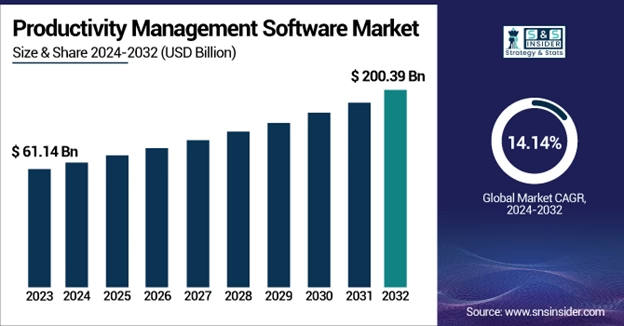
(Source – SNS Insider)
5 Best Content Production Management Software Tools
While there are many great content production management tools out there, we have narrowed down the list to what we believe are the five best project management software options for content production. Some of these tools offer an extensive library of templates and integrations, along with various project management tools to streamline your workflow. When comparing tools, it’s essential to evaluate their standout features, such as customizable dashboards and specialized functionalities tailored to your team’s specific needs, to ensure they meet your team’s unique requirements. If you’re going to build a list of potential candidates of your own, start with these.
1. HubSpot (Content Hub)

Summary
Content Hub is HubSpot’s content marketing software, which helps organizations produce and scale content expediently. What sets the tool apart is its advanced reporting and analytics features. The Content Hub offers a wide range of capabilities that will elevate your content to the next level. These capabilities include video and podcast hosting, advanced analytics, reporting, lead capturing, and content management.
Pricing Range – Free to $1,500 (Per month)

Key Features
- Reporting and Analytics Features including:
- Content optimization reporting
- Content generation via AI
- Lead capture features
- A/B testing capabilities
- Lead scoring capabilities
- ROI calculator
Pros
- Offers a free version
- Pricing (specifically for individuals and small teams)
- Educational content library
- 24/7 Customer Support services
- Onboarding services
- Ability to build landing pages and blogs
- Omni-channel marketing automation
- AI blogging capabilities
- Managed cloud hosting
Cons
- Extensive learning curve
- Free plan features are limited
2. CoSchedule

Summary
CoSchedule is an all-in-one marketing calendar and project management platform. Its primary focus is social media marketing, but it also enables users to create and manage their content. This tool allows marketing teams to plan, organize, and execute content strategy from a central dashboard. CoSchedule serves as a content planner that helps teams create content efficiently, simplifying the management and analysis of content to grow their audience effortlessly.
The CoSchedule software stands out for its visual marketing calendar, which provides a unique view of its marketing and content initiatives. CoSchedule also offers workflow management features.
Pricing Range – Free to $59 (Per month)

Key Features
- AI writing tool
- Headline analyzer
- Drag and drop content calendar and customizable color coding
- Social media analytics and reporting capabilities
- AI social assistant and AI campaign assistant
- Report scheduling
- Content performance analytics
- AI image generator
Pros
- Offers a free account
- Pricing
- Create and run marketing campaigns
- Social media posts across the following platforms:
- Bluesky Social
- Google Business
- X (Twitter)
- YouTube Shorts
- Integration with various tools, including:
- WordPress
- HubSpot
- Canva
- MailChimp
- Google Calendar/Google Drive
- Zapier
Cons
- Some advanced features are only available in the more expensive pricing plans
- Steeper learning curve for full platform utilization
3. Asana

Summary
Asana is classified as a content planning tool, but it’s more than that; it’s an extremely versatile project management platform. The platform is equipped with various features that help content developers and marketing teams manage their content development and marketing projects. They include management of unlimited tasks and projects as well as collaboration capabilities with multiple team members.
Asana also offers multiple views (list, board, timeline, calendar) that adapt to different planning styles and content types, which allows various teams to plan and execute their projects as they see fit.
Pricing Range – Free to $30.49 (Per month)
Important Note – If you want to use the Enterprise or Enterprise+ pricing plan, you must contact the Asana sales team.

Key Features
- Customizable content calendar views
- Workflow building capabilities
- Collaborate with up to 10 teammates
- Unlimited file storage (100MB per file)
- Unlimited messaging among team members
- Project tracking dashboards
- Calendar view capabilities
Pros
- Offers a free plan
- Integration with over 100 applications, including the following:
- GmailGoogle CalendarMicrosoft 365Microsoft TeamsSplunkZendesk
- Outlook Email
- Starter and Advanced pricing plans are favorable to small businesses and solopreneurs.
- Flexible views to accommodate different planning styles
- Robust free version offers many features
- Extensive integration ecosystem (100+ apps)
- Mobile apps for on-the-go content management
- Time tracking capabilities
- Project viewer and tracking capabilities
Cons
- Learning curve for new users
- Although the free plan comes with many features, it still lacks workflow automation capabilities
- There is no on-premises version of Asana
4. Monday.com

Summary
Monday.com is a work management tool that enables content teams to track and manage the development of their content. The tool enables organizations to plan, track, and execute projects from a centralized dashboard, facilitating team collaboration.
Monday.com comes with a wide variety of features that help teams organize tasks efficiently and boost productivity effortlessly. Features include the ability to share documents, time tracking, and unlimited messaging.
Pricing Range –Free to $19.00 (Per month)
Important Note – If you want to use the Enterprise pricing plan, you must contact the Monday.com sales team.

Key Features
- Ability to create unlimited project dashboards
- Ability to create unlimited documents
- Unlimited messaging and updates
- Time tracking
Pros
- Offers a free plan for up to 2 users
- Access to over 200 templates
- Available on mobile devices via iOS and Android
- Offers work automations
- Integration with over 200 tools, including:
- Slack
- Microsoft Teams
- Gmail
- DocuSign
- Zoom
- Dropbox
- Mailchimp
- Jira
- Offers trial AI credits
- Ability to create customizable notifications
- SOC 2 Type 2 Compliance
- 24/7 customer support
Cons
- It can become expensive for larger teams, especially if you require some advanced features
- Limited features in lower-tier plans
- Steeper learning curve due to extensive customization options
5. Notion

Summary
Notion is an all-in-one workspace management tool. The product offers numerous features that simplify content planning and production. Notion enables customers to connect their workspaces with team members and provides a central hub for individual documents, notes, and projects. The platform also features functions tailored to various functional groups, including IT, marketing, design, and engineering. Additionally, Notion excels in managing blog articles, making it a versatile tool for content creators trying to produce content.
Availability – Android, iOS, Mac, Windows
Price Range – Free to $24 (Per month)
Important Note – If you want to leverage the Enterprise pricing plan, you must contact the Notion sales team.
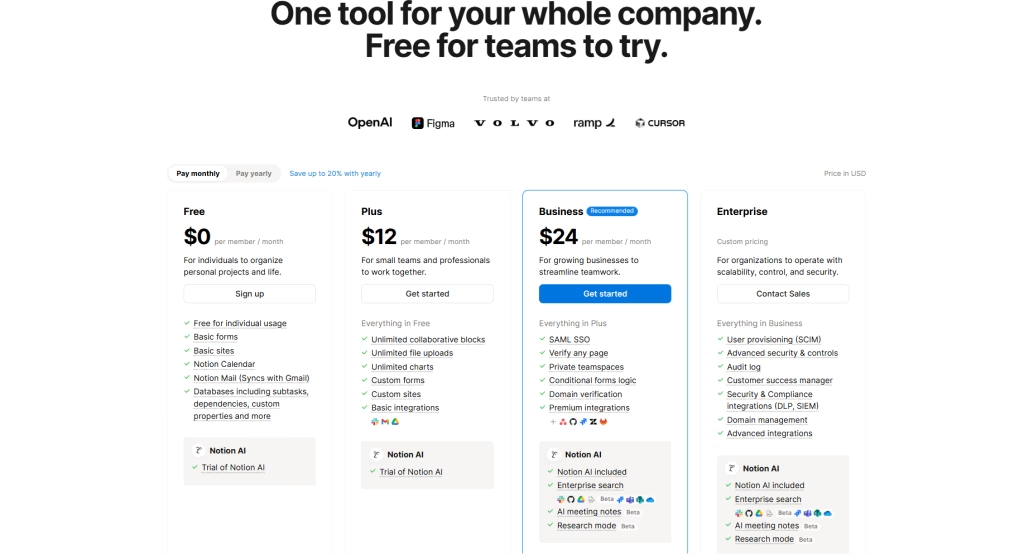
Key Features
- Web publishing capabilities
- Collaborative workspace capabilities
- Notion Mail can sync with Gmail
- Keeps page history as well as page analytics
- Integration with tools including Gmail and GitHub
- 2-step verification
- Audit logging capabilities
- Workspace analytics capabilities
Pros
- Offers a free version
- Ability to collaborate with external parties
- Calendar function allows for multiple team members to review
- Ability to assign subtasks and link dependencies
- Unlimited file upload capabilities
- Unlimited page publishing
- SEO indexing
- Google Analytics integration
- Offers custom domains and branding
Cons
- The free version of Notion has limited capabilities compared to its other plans.
- Most security features are only available with the Enterprise pricing plan
Benefits of Content Production Management Software Tools
There are many benefits that a content production management tool offers. These benefits go a long way in helping your team’s content development thrive while also enhancing teamwork. Each team member can contribute effectively by having clear roles, assigned tasks, and managed permissions, which improves overall team efficiency and team communication.
Content collaboration is a key benefit, enabling seamless collaboration through streamlined workflows, real-time communication, and efficient teamwork on content creation and review processes. Additionally, these tools help teams plan and organize for future projects, ensuring better resource allocation, project performance analytics, and strategic planning for upcoming work. Expense tracking is also a valuable feature, enabling teams to efficiently monitor and manage project costs as part of their budget management.
Streamlines Content Production Process
The ability to streamline your content production process is paramount to the success of your organization’s content development. The content production management tool enables your organization to automate repetitive tasks, such as scheduling, approval workflows, and publishing. Most content production management software also provides real-time visibility into project status, enabling teams to produce higher-quality content more quickly and efficiently.
Enhances Content Quality and Consistency
Content product management software tools provide standardized templates, approval workflows, and brand guidelines. These features can help your content team ensure all content meets quality standards and maintains a consistent voice and messaging across all your distribution channels.
Enhances Team Collaboration Capabilities
The content production tool centralizes all content-related tasks, deadlines, and communications in one platform. By centralizing content-related tasks, deadlines, and communications, it eliminates the need for email chains and scattered files. The tool also enables the following key collaboration capabilities:
- Real-time collaboration between writers, editors, designers, and stakeholders
- Review and approval workflows
- Content sharing
Project managers can use the software to control access and manage team permissions, ensuring that only authorized team members can view or edit sensitive information.
Enhancing team collaboration will not only improve your content but also help everyone understand the roles and responsibilities of each team member.
How to Choose the Best Content Production Management Software Tools for You
There is a lot that goes into choosing a software tool. It can be overwhelming to think about; however, if you develop a criterion that guides you, it will make things easier. Below is a short list of required criteria that should be included in your selection process.
Price
The price of the product is your compass; above all else, that is what should guide you. It’s important not to overspend. Most products are on a subscription basis (month to month), so you want to make sure you can afford it comfortably over time.
Ease of Use
The ease of use of a tool is also very important. No one wants to invest in something that is going to take a lot of time to understand. Many people want to pick up and go. When looking for a tool, try to investigate whether there are how-to guides, training offerings, and a free trial available. Free trials help gauge how fast you can use a tool, as they are time-limited.
Features
The features of a tool are another important criterion when investigating software tools. Ensure that you choose something that meets the needs of all your team members. The features must align with your organization’s goals and strategies. In terms of content production management software tools, there are a couple of non-negotiable features:
- Content Development
- Version Control and Revision History
- Collaboration and Communication
- Content Calendar Management
- Task Assignment and Project Management
- Integration Capabilities
Although these are some of the key features, add to your list, it’s by no means all of them. Add as many as your team believes will align with your goals and strategies.
Conclusion
Selecting the best content production management software is a critical decision that can significantly impact your team’s efficiency and content quality. The five platforms we’ve reviewed each offer unique strengths, from comprehensive project manag
ement capabilities to content planning and development features. The key is identifying which solution aligns best with your team size, content volume, collaboration needs, and budget constraints.
When evaluating features, consider whether the software includes Gantt chart functionality for advanced timeline management, task dependency visualization, and enhanced project tracking. Integrated client CRM features are also valuable for managing client relationships and streamlining communication.
Remember that the most effective content production software is one that your team will actually use consistently. Take advantage of free trials, involve your content creators in the evaluation process, and consider how each platform will scale with your growing content needs. With the right tool in place, you’ll be able to transform your content production from a scattered process into a well-orchestrated system that delivers better results and reduces stress for everyone involved.