
You have a website full of content. Blog posts, landing pages, and articles you wrote years ago. But do you know what is actually working? A good content audit template can help you find the best and worst pieces of your site content.
It is easy to keep publishing new stuff. But sometimes the best results come from improving what you already have. Using a content audit template is the first step in creating a real strategy for your website content. Through this guide, you’ll learn what a content audit is, why it’s important to perform one, as well as a step-by-step guide for building and performing one.
What is a Content Audit and Why Perform One?
Think of content audits like spring cleaning for your website. With my years of experience in the IT security field, I’ve learned that audits are
critical. With an inventory of the applications in my organization, it will be hard to determine where the issues are in the end.
In a content audit, you review every piece of content you have published and decide what to keep, what to fix, and what to throw away. It is a process for creating a content inventory of all your web assets and analyzing their performance.
But why should you spend time on this? The benefits are huge. A thorough audit helps you spot which pages bring in the most organic search traffic and which ones aren’t helping you.
By identifying pages that aren’t helping you, you’ll be able to determine which need a refresh to meet current SEO standards. This auditing process directly impacts your website’s health and ability to rank.
The Tools You’ll Need to Get Started
You do not need a huge budget to do a proper website content audit. The lack of a huge budget is excellent news, especially if you’re a solopreneur or any organization on a limited budget. Most of the tools you need are probably ones you already use, and many are free. Getting these ready before you start your audit will make the whole process much smoother.
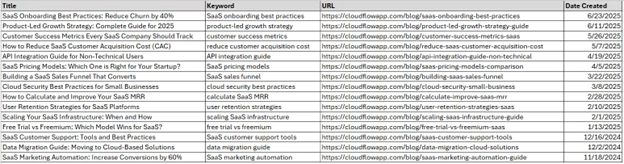
Your primary audit tool will be a spreadsheet. If you already have Microsoft Excel, I recommend using that. If you don’t already have Excel, Google Sheets works perfectly and is free. Inventory of your content is paramount; without it, your content audit is useless. Use your spreadsheet to track all of your content’s information.
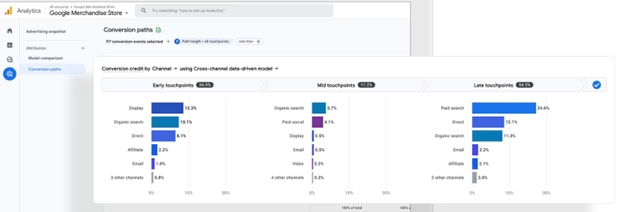
You will also need access to your website’s data. Google Analytics will show you how people behave on your pages, including metrics like the following:
- Bounce Rate – Visitors who leave your website without performing any actions, like clicking on a link or viewing another page.
- Total Visitors – Number of total website visitors during a specified period of time. For example, 1000 visitors over a 30-day span.
- Total Clicks – Number of clicks during a website visit.
In addition to Google Analytics, you should also leverage Google Search Console. Google Search Console gives you valuable information on your search performance and what keywords users use to find you.
Analytics Tools and Plugins
For WordPress users, an SEO WordPress plugin like Yoast SEO can be beneficial. These tools can provide a quick overview of your on-page SEO for each post. This kind of WordPress SEO plugin often has features that can streamline parts of your data collection.
Key data collected by Yoast SEO include the following:
- SEO Title – Blog post title. The title is generally 50-60 characters long, designed to attract clicks from visitors.
- Slug – A URL-friendly version of a page title. For example, “https://www.davidlhicks.com/content-strategy“.
- Meta Description – A brief character summary of your blog post; it’s generally 150-160 characters.
- Outbound Links – Hyperlinks on your webpage that direct visitors to external websites or resources outside your own domain.
- Images – Visual content elements (photos, graphics, screenshots) embedded within a webpage.
- Internal Links – Hyperlinks on your webpage that direct visitors to external websites or resources inside your own website.
For those who want to branch out and use other content audit tools, try Ahrefs for keyword research and Screaming Frog’s SEO Spider tool for website crawling and analysis.
Your template is your command center for the entire audit. You can add more columns if you want, but these categories give you a fantastic foundation for making wise decisions.
Below is a simple table you can copy and build upon in your own spreadsheet. Each column serves a specific purpose to give you a complete picture of your content’s health.
| Data Sets | Information Type |
|---|---|
| URL | Basic Information |
| Page Title | Basic Information |
| Content Type | Basic Information |
| Publish Date | Basic Information |
| Organic Traffic | Key Performance Metrics |
| Focus Keyword | Key Performance Metrics |
| Backlinks | Key Performance Metrics |
| Conversions | Key Performance Metrics |
| Content Quality (1-5) | Qualitative Review |
| Action | Action Plan |
| Notes |
Let’s break down what each of these columns means and why it is crucial for your analysis of the content created for your site.
The Basic Information
This section is all about cataloging what you have. It seems simple, but getting this part organized is critical before you start digging into the data. You have to document all your previous content and the key information associated with it. From a fundamental standpoint, this is where the following key aspects of your template come in.
- URL – Your URL is the specific web address of your content.
- Page Title – The page title is your H1 tag, a critical SEO factor.
- Content Type – Your content type helps you categorize your work. Content types include blog and guide content, landing pages, and product pages.
- Publish Date – This tells you how old the content is. Publish date is crucial for quickly identifying potentially outdated content that may need a refresh.

Key Performance Metrics
Key performance metric numbers tell a story about whether your content connects with an audience and search engines. Gathering this data is a key part of the content audit process.
- Organic Traffic – Shows how many people found your page from a search engine within a specified period of time. For example, 30, 60, or 90 days are great options to leverage.
- Focus Keyword – Main term you are writing about and trying to rank for.
- Backlinks – Links from other websites to your content. The more websites linking to yours, the better.
- Conversions – Track how many people took a desired action, such as signing up for a newsletter or buying a product. If you are not tracking conversions.

The Qualitative Review
Numbers do not always tell the whole story. A qualitative review is your chance to use your human judgment to review the quality of the content itself. This step is about evaluating content beyond the raw data.
Give each piece a Content Quality score from 1 (poor) to 5 (excellent). Ask yourself a couple of the following questions:
- Is the information still accurate?
- Is the content written well and easy to read?
- Does the link text make sense and help the user?
Be honest here. A post from five years ago might have been great then, but it could be outdated or poorly formatted now. You should also consider whether the content is accessible and aligns with your brand’s current voice and digital marketing goals.
The Action Plan
The action requirement column within your spreadsheet is the most important part of your content audit template. This column is where you decide what to do with each piece of content based on all the data you have gathered.
Your choices are simple; you have the options to perform the following:
- Keep – This content is performing well and is high-quality. It needs no immediate changes.
- Improve – The content is good, but could be improved. It may need updated statistics, more depth, or better on-page SEO.
- Consolidate -You have two or more posts on a very similar topic. Neither is performing great. Combine them into one powerful, comprehensive article and redirect the old URLs.
- Prune -This content is low-quality, gets no traffic, and is no longer relevant to your business. Deleting this content helps your SEO by telling Google to focus on your higher-quality pages. A study by Backlinko shows that pruning can improve rankings.
This decision will create your content strategy for the next several months. Your Notes column is for any extra thoughts, like “Update stats,” “Improve meta description,” or “Combine with other posts on this topic.”
A Step-by-Step Guide to Your Content Audit
Now that you have your template, how do you even fill it out? The process can feel big, but breaking it down into steps makes it manageable, especially if you’re doing this alone. Do not try to do it all in one shot.
Step 1: Get a List of Your URLs
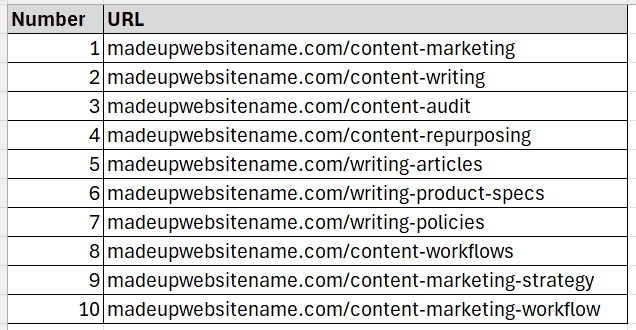
First, you need a list of every single page on your website you want to audit. You can get this from your sitemap.xml file, which is usually found at yourdomain.com/sitemap.xml. This initial list forms your content inventory.
For more technical help, an audit tool like Screaming Frog can crawl your website and export a list of all URLs.
Step 2: Fill In the Basic Information
This part is manual but pretty straightforward. Go down your list of URLs and fill in the Page Title, Content Type, and Publish date for each one. This initial phase of the audit process helps organize all your content pieces.
It can be tedious, especially with a large site with a lot of blog content. Put on some music and just power through it. This groundwork is necessary for deeper analysis later and will give you a complete picture of the content live on your site.
Step 3: Collect the Performance Data
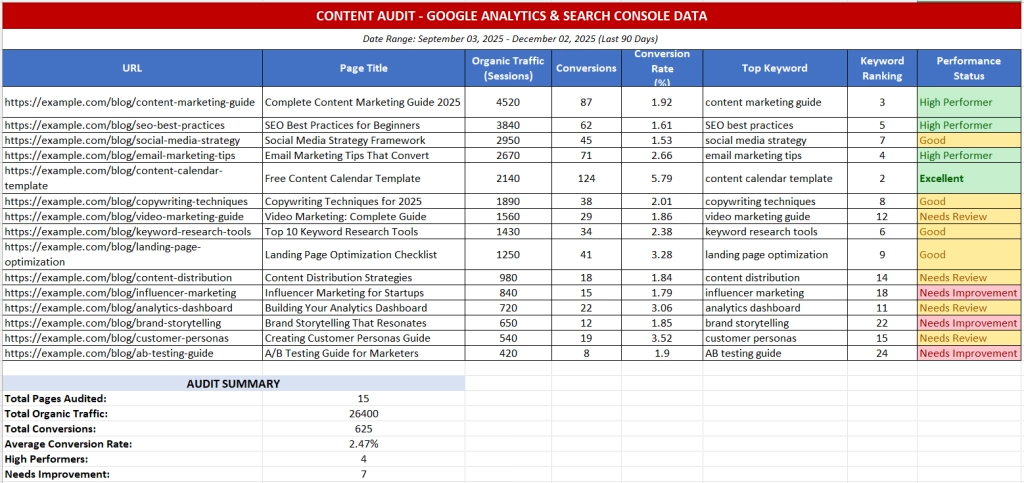
It is time to open up Google Analytics and Google Search Console. For each URL, find the corresponding data points, such as organic traffic, conversions, and top keywords. This data helps you see how your content meets the needs of users who find it through organic search.
Look at a recent time frame, like the last 90 days, to get a current picture of performance. Input these numbers into your template. You will quickly start to see patterns emerge as the audit spreadsheet fills up with valuable information.
Step 4: Make Your Quality Judgments
With the data in place, it is time to read your content. Visit each URL and review it with a critical eye. Is it helpful, and does it improve accessibility for all users? Is it still accurate and relevant?
This is when you will assign your Content Quality score. Ask yourself if you would be proud to share this piece of content with your audience today. Your answer will guide your decision in the next step of the auditing process. With your quality score, keep it on a scale of 1-5, 1-10, or 1-100. Be consistent; don’t change your scale, as it can confuse you when reviewing your information.
Step 5: Assign an Action to Everything
Now you can decide the fate of each piece of content. Based on its traffic, quality, and relevance, choose an action from the list noted above. These options are keep, improve, consolidate, and prune.
Turning Your Audit into an Actionable Strategy
Your completed content audit template is not just a document. It is a roadmap for your future content marketing efforts. You have done the hard work of gathering data, so now it is time to put it to use.
Start by sorting your spreadsheet by the Action column. This groups all your tasks together. You can see all the articles you need to ‘Improve’ in one block, which makes project management much easier for your content creators.
Look for the quick wins. A post that gets good traffic but has a low-quality score or a high bounce rate is a prime candidate for improvement. Updating it could give you a significant boost with little effort.
Create a schedule for content creation and updates. You cannot do everything at once. Plan to update two blog posts a week or consolidate one topic a month. A consistent effort will yield much better results than trying to tackle it all in one weekend, and regular content audits should be part of your content maintenance workflow.

Conclusion
A content audit can feel like a massive project, but its value is hard to overstate. It shifts your focus from just creating more content to creating better content that serves both your audience and your business goals.
By systematically evaluating the content you have, you can make informed, strategic decisions instead of just guessing what will work.
The process gives you a clear plan of attack. You will know exactly which pages to update, which to combine, and which to remove for better SEO performance. A well-structured SEO content audit transforms a messy library of content into a high-performing strategic asset.
Using a content audit template is the best way to get organized and begin. Regular content auditing helps you stay on top of your game, ensuring your website remains a powerful tool for your digital marketing strategy. This guide content audit provides a solid foundation to start that journey.